
SkyCandy - Sunset Forecast App
Dunbar Technology, LLCWeather
3.2137.00 Reviews
- Version
- 2.8.0
- Installs
- 10.00K
- Age Rating
- Everyone
Screenshots

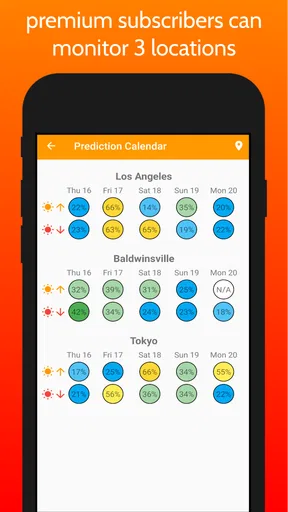
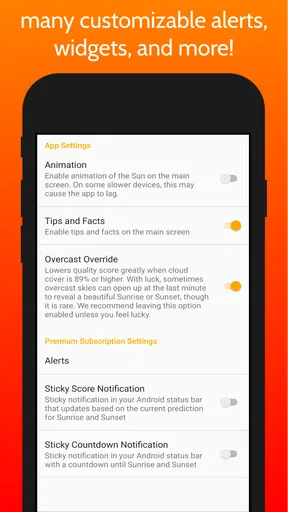
Our Review of SkyCandy - Sunset Forecast App
 Analysis by Appyee
I like weather apps that help me decide what to do, but SkyCandy - Sunset Forecast App approaches the subject from a more visual and occasional angle. Instead of trying to replace a full daily forecast, it is aimed at people who want to know when the sky might be worth watching. I found that distinction important from the first use: this is less of a rain-and-temperature dashboard and more of a planning companion for sunrise and sunset moments.
That makes it especially interesting in a shared household. One person can use it to decide whether an evening walk is worth delaying dinner for, while another can check it before taking children outside, arranging a picnic, or choosing a place for photographs. It is free to install, rated for Everyone, and developed by Dunbar Technology, LLC. The current version is 2.8.0, and it works on devices running Android 7.0 or later.
How SkyCandy fits into everyday household planning
My favorite use for this kind of app is not opening it every hour. It is checking it at a useful decision point. Imagine a household where everyone is finishing work, school, or errands at different times. Someone notices that the evening may produce an attractive sky and checks the app before sending a message to the others. The question is not simply “What is the weather?” but “Is it worth meeting outside for a few minutes?”
That small change in focus gives SkyCandy a clear purpose. A conventional weather service is better when I need temperatures, precipitation, wind, warnings, or a detailed forecast. SkyCandy is more appealing when the visual quality of the sky matters. It can help turn a vague idea such as “maybe we should watch the sunset” into a more deliberate plan, without requiring the whole household to study a long forecast screen.
For shared-device use, I would keep expectations realistic. The app can support coordination because people can check the same forecast and discuss a time or place, but it should not be treated as a household scheduling system. I would still use a family calendar, group chat, or another ordinary communication tool to confirm who is coming and what everyone needs to bring. The app’s value is in informing that conversation, not replacing it.
A practical routine for a busy evening
My suggested routine is simple. Check the forecast earlier in the day, decide whether the possible sky is worth planning around, and then look again closer to the intended outing. That second check matters because attractive-sky planning is naturally more sensitive to changing conditions than a casual glance at a calendar. If the household has young children, it also gives adults time to adjust clothing, snacks, transport, and the length of the outing.
A useful trick is to agree on a backup plan before anyone leaves. If clouds become too thick, the family might watch from a nearby window, move the outing to a short walk, or simply treat the check as a reason to spend a few minutes outdoors. This prevents the app from turning a pleasant idea into a disappointing all-or-nothing event.
Another non-obvious benefit is that it encourages better timing. Many people notice a sunset only when it is already happening, then discover that the best viewpoint is too far away. Using the app as a prompt to prepare early is more valuable than repeatedly refreshing it at the last moment. In that role, it becomes a planning cue rather than just another weather screen.
Setup, device boundaries, and what I would expect
SkyCandy is a focused weather app, so I would approach setup with a narrow goal: make it useful for checking sky conditions, then avoid expecting the onboarding experience of a larger forecasting platform. On a household device, I would first decide who is likely to use it and whether the screen is shared casually or belongs mainly to one person. That matters because a shared tablet or phone can become a common reference point, while a personal phone may be used for quick individual decisions.
There is no reason to assume that installing it on one device creates a shared household profile. If several people want access, each person should use the app in the way supported by their own device and keep coordination in the household’s normal communication channel. I would not hand over account credentials or treat one person’s setup as proof that everyone has the same view. Keeping those boundaries clear avoids confusion when someone checks the app from another phone.
The Android requirement is also worth considering before installing it on an older family device. A phone or tablet running Android 7.0 or newer meets the stated minimum, while a device below that level is not a suitable target. For a household with a mixture of old and new hardware, I would test the intended device first rather than assume that every shared screen can run the same app.
The app is free, but in-app purchases range from $0.99 to $99.99 per item. That is the one setup detail I would discuss openly in a shared household, especially if children can use the device. Free installation does not mean every optional purchase is automatically appropriate for everyone. I would review purchase settings on the device, explain who is allowed to buy anything, and avoid letting a child interpret a visible purchase option as permission.
Why the setup boundary matters
Weather apps often become background tools that people open without thinking. On a shared device, that habit can create a different problem: one person may change a setting, location, or preference and another person may assume the screen still represents their own needs. I would therefore make the device’s primary use clear. If it is the household sunset-planning screen, leave it in an easy-to-understand state. If it is a personal phone, each user should verify the relevant location and forecast before making a plan.
This is not a criticism unique to SkyCandy; it is a practical limitation of using any location-aware weather tool across multiple people. The app can be useful for a shared conversation, but the household should not confuse convenience with a formal multi-user system. That distinction is particularly important when one person is planning an outing for others.
I also would not install it as the only weather resource on a family device. Its focus is attractive, but a household may still need a standard forecast app or another trusted source for severe-weather information and basic daily decisions. SkyCandy can complement that routine, while a broader weather service remains the better tool for safety-critical planning.
Coordinating a plan without overpromising certainty
The strongest household workflow is to use SkyCandy for inspiration and another communication method for confirmation. One person can check a promising evening, send a message suggesting a meeting time, and let everyone respond. That keeps the app in its proper role and prevents a forecast from being mistaken for a guarantee.
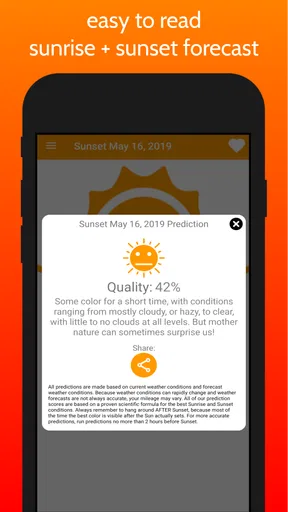
Sunset planning has a natural uncertainty that families should respect. A forecast can suggest a vivid or colorful sky, but the actual experience depends on what happens in the atmosphere and what the view looks like from the chosen place. Buildings, trees, hills, haze, and unexpected cloud cover can all change the result. I like the app more when I treat its guidance as a reason to look outside, not as a promise that the sky will match a prediction.
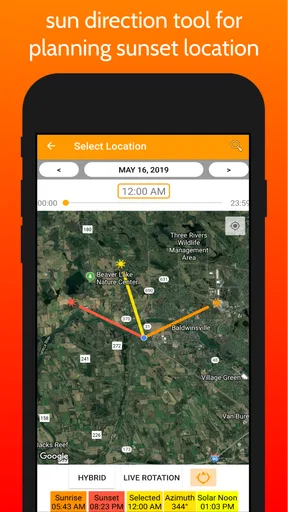
For that reason, I would choose a flexible meeting location. A nearby park, open street, balcony, or accessible hill may work better than a distant destination that requires a long trip. If the sky is less impressive than expected, the household has still spent less effort and can change plans easily. This is one of the most useful trade-offs: the app encourages anticipation, but good planning keeps the commitment modest.
It can also help households with different interests. A photography enthusiast may want to watch every promising evening, while another family member may only care about a short walk. Instead of forcing everyone into the same level of enthusiasm, use the forecast to offer options. The person who wants photographs can arrive early, while others join for a brief viewing period. The app supports coordination best when it makes participation easier rather than turning the forecast into an obligation.
Using the app for small, repeatable moments
I would not reserve SkyCandy only for special trips. A better routine is to use it for small occasions: a short after-dinner walk, a quiet moment on a balcony, or a weekend coffee outside. These low-effort uses reveal whether the app genuinely fits a household. If the family enjoys checking the sky together, it has earned a place in the routine. If every check leads to complicated travel or disappointment, a regular local-weather app may be more practical.
Another useful approach is to compare the forecast with what the household actually sees. Over time, users can learn which nearby viewpoints work best and how much travel time is sensible. I would keep those observations in a shared note or chat rather than expecting the app to serve as a family journal. The insight comes from combining the app’s forecast with local experience.
This also helps children understand forecasts in a healthy way. They can see that a prediction is an informed suggestion, not a guarantee. That lesson is more valuable than simply chasing a colorful sky, and it reduces the chance that a missed sunset feels like the app has “failed.”
Age, trust, and responsible shared use
Because SkyCandy is rated Everyone, it is suitable in age terms for a broad audience. I still would not assume that a child should manage every part of a shared-device routine independently. The important questions are practical: who controls purchases, who decides where the household goes, and who checks whether the outing is appropriate for the day’s conditions?
For younger users, I would make the app part of an adult-guided activity. A child can help choose whether to look for the sunset, but an adult should handle travel, supervision, and any purchase decisions. This is not because the app’s subject is unsuitable; it is because a forecast tool can influence real-world plans, and those plans need ordinary household judgment.
Trust also applies to the forecast itself. I would teach children and less experienced users not to rely on a colorful-sky prediction for decisions involving safety, long-distance travel, or rapidly changing weather. The app is enjoyable for deciding whether to step outside and look upward. It is not the tool I would choose as the sole basis for deciding whether conditions are safe for a demanding outdoor activity.
On a shared phone, privacy expectations should remain simple and explicit. Each person should know whether they are checking a household location, a personal location, or a general forecast. If the device is passed among family members, I would avoid assuming that one person’s screen state represents everyone’s plans. A quick verbal confirmation is often enough.
The same principle applies to purchases. Since optional items can cost from less than a dollar to nearly a hundred dollars, adults should decide whether purchases are enabled and who may authorize them. I would not let a child explore purchase screens unsupervised, and I would explain that the app being free to download does not make every optional item free.
Who will appreciate it most?
SkyCandy makes the most sense for people who enjoy visual weather, outdoor pauses, photography, scenic walks, or simple family rituals. It is also a good fit for someone who finds a full weather dashboard overwhelming and wants a narrower reason to check the sky. The app’s focus can be a strength when the user already knows what kind of moment they are trying to plan.
I would be more cautious about recommending it to someone who wants one app to cover every weather need. If your priority is hourly rain timing, detailed wind information, severe-weather alerts, commuting conditions, or a broad seven-day overview, a conventional weather service is likely the better primary choice. SkyCandy should sit beside that tool, not necessarily replace it.
It may also disappoint users who expect a social family platform, automatic coordination, or a complete shared calendar. The household value comes from how people use the forecast together, not from assuming that the app manages family roles. If your main goal is assigning tasks, tracking children, or confirming attendance, use an app designed for those jobs.
My household verdict on SkyCandy
After using it as a sunset-planning companion, I see a clear but limited strength: it gives a household a reason to pay attention to the sky. That sounds modest, but it can be genuinely useful. A shared check can lead to a short walk, a conversation, or a small break from screens. The app works best when the goal is enjoyment rather than precision-heavy weather management.
Dunbar Technology, LLC has positioned this as a specialized weather experience, and the store summary’s emphasis on sunrise, sunset, and colorful skies matches that role. It has an average rating of 3.2 from around 558 ratings, with more than a hundred written reviews, so I would approach it with balanced expectations rather than assuming it will satisfy every weather user. Its install base is over 10K, which suggests a modest audience compared with mainstream weather services.
The free entry point makes it easy to try on a compatible Android device, and the Everyone rating makes it reasonable for shared household exploration. The main caution is financial: optional in-app items span a wide range, so purchase boundaries deserve attention when children or guests use the same device. I would also keep a broader weather source available for ordinary forecasts and safety decisions.
My honest recommendation is to treat SkyCandy as a small planning spark, not as the household’s complete weather authority. If your family enjoys sunset walks, scenic views, photography, or quiet outdoor routines, it can add purpose to moments that might otherwise pass unnoticed. If you need detailed forecasting, dependable coordination tools, or a single dashboard for every weather question, choose a more comprehensive alternative and use this app only as a visual companion.
For the right household, that narrower purpose is exactly why it can be enjoyable. Check it together, keep plans flexible, protect purchase boundaries, and let the real sky have the final word.
Verdict
Strengths of SkyCandy - Sunset Forecast App
- Colorful sunset forecasts make planning photo outings easier.
- Location-based predictions are quick to access.
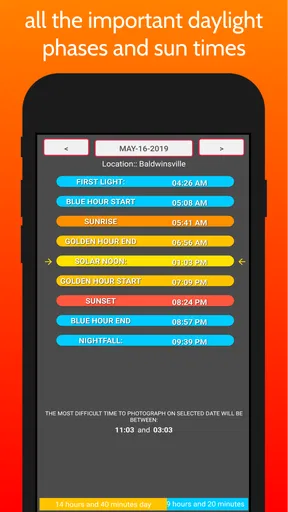
- Useful timing details help users arrive before golden hour.
- Clean interface is easy to understand at a glance.
- Can inspire daily outdoor walks and photography sessions.
Limitations of SkyCandy - Sunset Forecast App
- Forecast accuracy may vary with local weather and cloud changes.
- Some locations may have limited historical or forecast data.
- Sunset times are less useful in areas with frequent overcast skies.
- Frequent notifications could feel unnecessary for casual users.
- Advanced features may require payment or in-app purchases.
Other Releases by Dunbar Technology, LLC
View All
Fotocast - Weather Forecast fo
Weather3.9
Similar Picks in This Category
View All
Weather - By Xiaomi
Xiaomi Inc.4.1

Weather & Radar Forecast
WetterOnline4.8

Weather
OneLouder Apps4.6

AccuWeather: Weather Radar
AccuWeather3.6

The Weather Channel - Radar
The Weather Channel4.6

1Weather Forecasts & Radar
OneLouder Apps4.3
Frequently Asked Questions
What is SkyCandy – Sunset Forecast App?
SkyCandy is a sunset and sky-watching app designed to help you discover when and where beautiful sunsets are likely to appear. It provides forecast information based on factors such as cloud coverage, visibility, weather conditions, and location. After allowing location access or entering a place manually, you can use the app to plan photography sessions, evening walks, travel activities, or simply find better opportunities to enjoy colorful skies.
How accurate are SkyCandy’s sunset predictions?
SkyCandy’s forecasts are useful planning tools, but they should not be treated as guaranteed predictions. Sunset colors depend on changing cloud formations, atmospheric particles, haze, rain, and local weather conditions that can shift quickly. The app combines available weather and location data to estimate the quality of a sunset, so its results are generally more helpful than checking sunset time alone. Always look at the latest forecast before heading out.
Does SkyCandy require my location, and can I use it without location access?
The app can use your device location to provide sunset forecasts for your current area, which makes the experience faster and more convenient when traveling or exploring nearby places. If you prefer not to share location access, you may be able to search for or select a location manually, depending on the version and platform. Review the app’s permission request carefully and check its privacy information before enabling location services.
What features are useful for photographers and travelers?
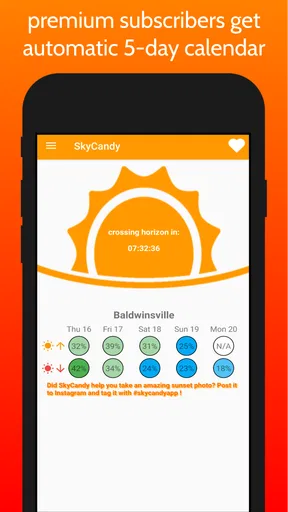
SkyCandy can be especially helpful for photographers, outdoor enthusiasts, and travelers who want to plan around golden-hour conditions. Its forecast view helps you compare upcoming sunset opportunities, while location-based information can make it easier to choose a suitable destination. However, you should still consider practical details such as access, weather warnings, terrain, opening hours, battery life, and whether the selected viewpoint has an unobstructed view of the horizon.
Is SkyCandy free to download, and are there any in-app purchases?
The availability of free features, advertising, subscriptions, or one-time purchases may vary between Android and iOS and can also change with future updates. Before downloading, check the current store listing for the exact pricing model, included tools, and subscription terms. If the app offers premium forecasts or additional planning features, confirm the renewal price and cancellation policy so you know what will be charged after any trial period.
